Where is your lifeout of balance?
Score eight parts of your life from 1 to 10. The wheel draws itself — and shows you where to start.
Then turn the low scores into a few small next steps.
- Instant access
- Google Sheets only — not Excel
- 14-day refund
Google Sheets template · not for Excel
See it in action
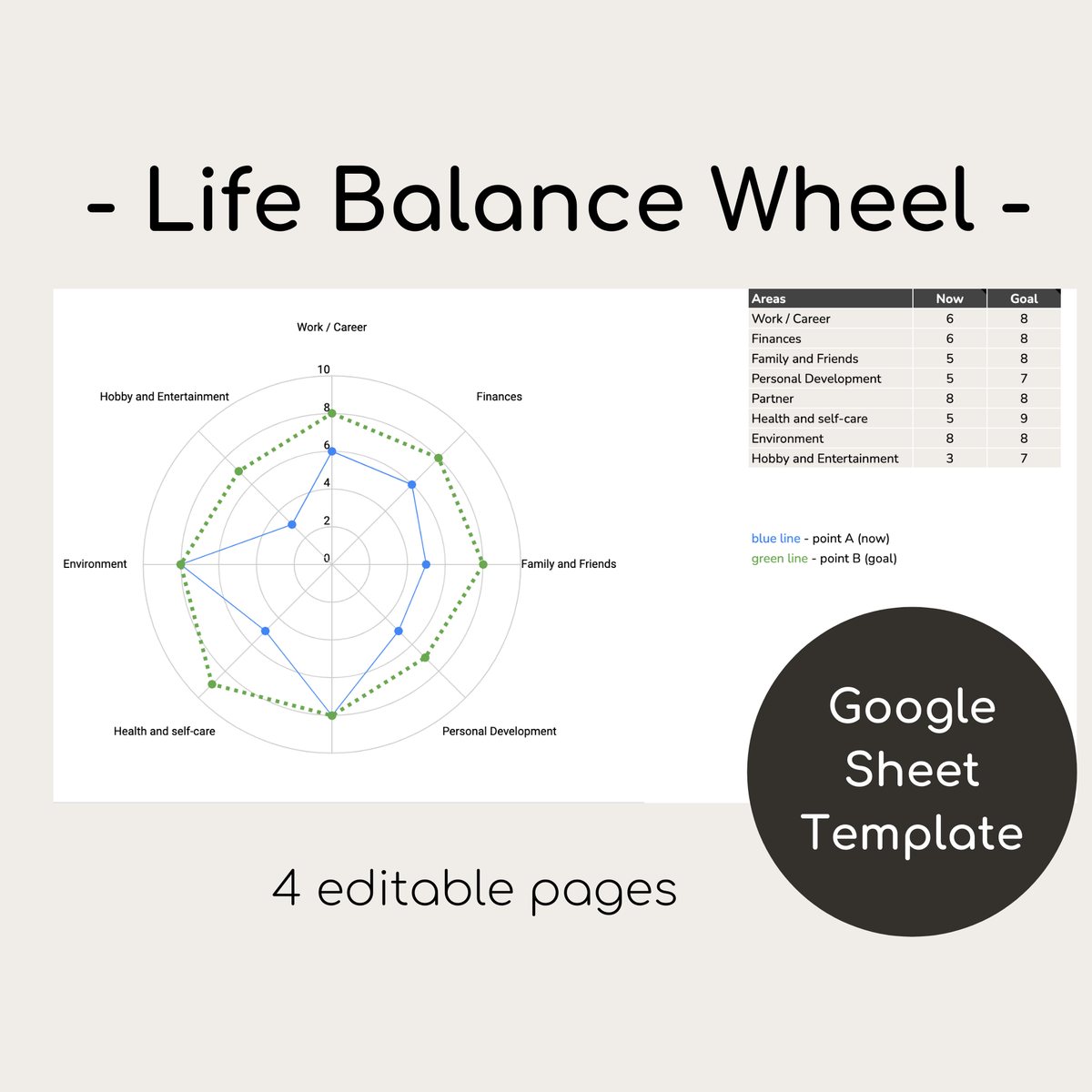
Type a number. The wheel redraws.
- Blue line — where you are now
- Green line — where you want to be
- The space between them is your plan
The eight areas are examples. Rename them and the wheel follows.
How it works
Three steps, about 20 minutes
- Score where you areGive each area a number from 1 to 10. Go with your gut — it takes five minutes.
- Set your goalsPick where you want each area to be. Two or three points higher is plenty.
- Plan your next stepsOn the Action plan tab, write a few steps for each area, with a deadline.
Look inside
Four tabs. Tap to see them.
You type in a few cells. Everything else — including the wheel — updates by itself.
What buyers said
Reviews of this template from our Etsy shop.
“Great resource and easy to use.”
“great product that suits my needs into the future.”
“Very easy to use to develop a life plan!”
“It does exactly what it says it will”
“A very useful tool to help you get your life in balance”
“Fully adaptable, areas as well as rating grades can be added or removed and renamed. I don't totally appreciate the use of Google Sheets. Exportable to Excel and is visibly less attractive.”
“Excellent product; using it gives me a better perspective on life.”
“This is simply AMAZING!!!”
“Definitely 5 stars. I was able to create fictitious people and tell their wellness stories as example for their self care planning. It really helped me to create a impactful presentation.”
“Great for our Couples Planning weekend!”
“Thank you for this great template”
“This is great! I find it is really good to see what where I need to develope more!”
“I love this spreadsheet. It's intuitive and so easy to use. Also got a quick response to a question about customizing the template. If you're into spreadsheets this one will make you happy. :)”
Get the template
Life Balance Wheel
One-time payment. Instant access.
This is a Google Sheets template. You need a free Google account. It doesn't work in Excel.
- A wheel that redraws as you type
- Where you are and where you want to be, on one chart
- Step-by-step instructions
- An action plan with deadlines, plus examples
Not useful? Get your money back. Write to us within 14 days. No questions.
Secure checkout by Paddle · Card, Apple Pay, Google Pay, PayPal
Questions
Before you buy
How do I get it?
Right after checkout you'll see a “Make my copy” button. One click copies the template into your own Google Drive.
What do I need?
A free Google account. It opens in Google Sheets in your browser, or in the Google Sheets app on a phone or tablet. A computer or tablet is easiest.
Can I change the areas?
Yes. The eight areas are examples. Rename any of them and the wheel updates.
Does it work in Excel?
No — the wheel only works in Google Sheets. All you need is a free Google account.
Can I print it?
It's made for the screen, not paper. You can still print any tab from Google Sheets.
Can anyone else see my answers?
No. Your copy lives in your own Google Drive, and only you can open it unless you share it. We can't see it.
What if it's not for me?
Write to us within 14 days and you'll get a full refund. See the refund policy.
Five minutes to see it. One small step to change it.
Where you are, where you want to be, and what to do next — on one page.
Get the template · $9